 DailyWall
 Drink water
 Water the plants
In DailyWall, tap + → Set up a habit → Drink water, then choose how many glasses a day (1–20) and your glass size (200, 250, 330 or 500 ml). A paper with that many dots appears on your wall and Lock Screen each day, and you tap + to fill a dot after every glass.
Drinking enough water is one of those habits everyone agrees with and almost nobody tracks well. The problem is rarely willpower; it's that thirst is easy to ignore when you're busy, and a water app hidden on page three of your Home Screen is even easier to ignore. DailyWall puts a small paper on your Lock Screen that says "Drink water" with a row of dots, one for each glass. You see it every time you pick up your phone, and you fill a dot each time you drink.
Why track water at all?
Your body is mostly water, and many health bodies suggest that most adults get enough fluid from a mix of drinks and food across the day, more in hot weather or when you exercise. Needs vary a lot from person to person, so treat any number as a personal goal, not a rule. If you have a medical condition that affects fluids, follow your doctor's advice rather than a generic target.
The reason to track isn't to hit a magic figure. It's that most people underestimate how little they drink on busy days. A visible count makes the gap obvious: if it's 3pm and only two dots are filled, you know without doing any maths.
How to actually build the habit
Water is the easiest habit to stack onto things you already do. These small tricks help far more than a louder reminder:
Tick the steps as you go
Set up your water habit in DailyWall
The paper comes with its own 3 water-themed washi tapes and 3 stickers, so it's easy to spot among your other notes.
Tick the steps as you go
What it looks like on your Lock Screen
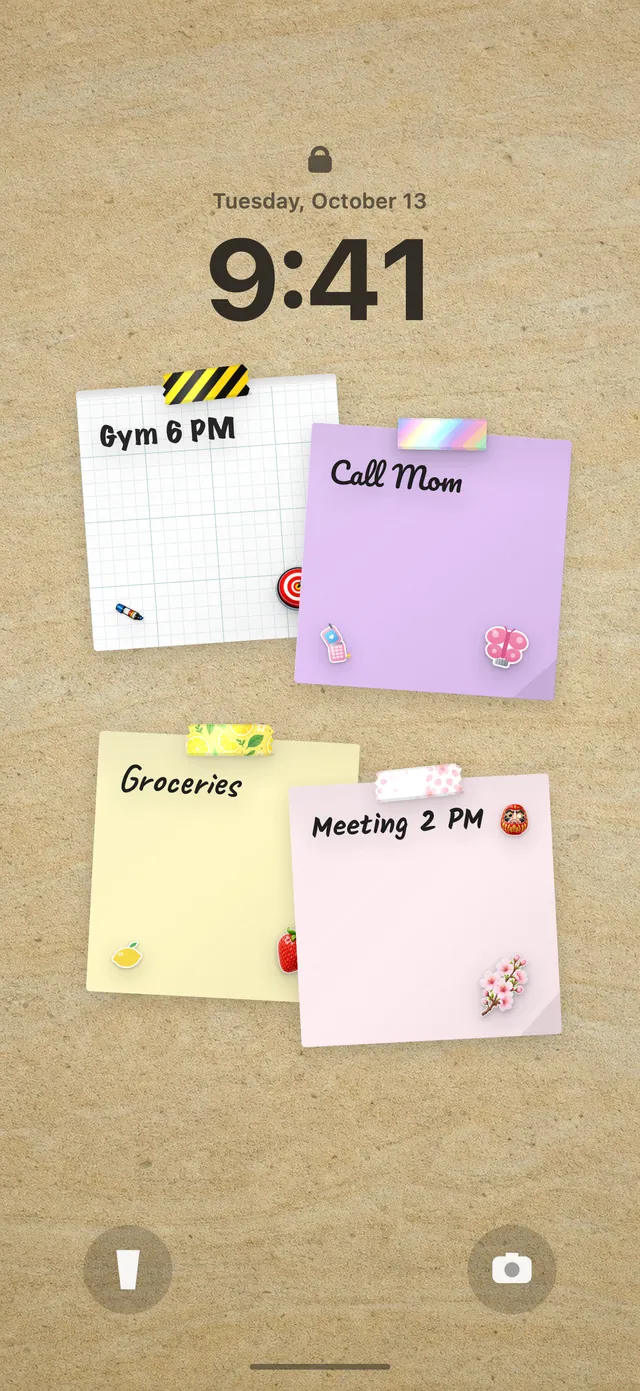
Because your DailyWall wall is your Lock Screen wallpaper, the water paper sits under the clock with its row of dots. Each time you drink, open the app and tap + on the paper to fill one dot. When you close DailyWall, the Shortcuts automation refreshes the wallpaper, so the next time you glance at your phone you see "3 of 8" instead of an empty row.
It's a quiet kind of reminder. There's no badge or alert demanding attention; the half-empty row of dots does the nudging. If you haven't set up the Lock Screen wallpaper yet, our guide to putting notes on your iPhone Lock Screen walks you through the one-time setup.
Missed a day? Nothing breaks
Some days you'll forget, travel, or simply be too busy to tap the dots. In DailyWall, that day's water paper isn't carried over and there's no streak to lose. It stays faded on its own day, and tomorrow a fresh paper with empty dots is waiting.
If you keep missing, the goal is probably too high or the reminder time is wrong. Lower the glasses, or move the reminder to a moment when you're actually near water, like lunch.
A 7-day water starter plan
Tick the steps as you go
Questions people ask
How many glasses of water should I drink a day?
There's no single number for everyone. Many health bodies give rough daily fluid guides for adults that include water from food and other drinks; your needs depend on your size, activity and climate. Pick a goal that feels realistic and adjust it.
Can I see my water intake on my iPhone Lock Screen?
Yes. DailyWall's habit paper shows dots for each glass, and because your wall is your Lock Screen wallpaper, it's visible under the clock.
Does DailyWall sync water intake with Apple Health?
No. The water habit is a simple, visible count on your wall. It doesn't read or write Apple Health data.
Can I track water in ml instead of glasses?
You count glasses, but you choose the glass size (200, 250, 330 or 500 ml), so 8 glasses of 250 ml means 2 litres.
Is the water tracker free?
Yes, your first habit is free and it doesn't count toward the 5 free notes a day. Pro unlocks unlimited habits.
 A reading habit tracker that keeps your book in sight
 A workout tracker that shows up before your excuses do
 How to build a meditation habit that survives busy weeks
 How to start a journaling habit (and actually keep it)
 How to fix your sleep schedule with one gentle bedtime habit
 A vitamin and medicine reminder that sits under the clock
 A daily walking habit you see every time you check the time
 A daily stretching routine you'll actually remember
 A no sugar challenge you see every time you pick up your phone
 How to wake up early (and keep doing it after the first week)
 A gratitude journal habit that takes two minutes a night
 How to build a language learning habit that survives busy weeks
 How to build a saving money habit, one small deposit a week