 DailyWall
 Save money
 Water the plants
Pick one goal, a small fixed amount and a set day, and move the money as soon as you can on that day. In DailyWall, tap + → Set up a habit → Money → Save money, write what you're saving for (for example a vacation) and how much, in your phone's currency ($50 is the default). The habit is set to once a week: the paper shows up on your wall and Lock Screen until you tick it off, then rests until next week.
Saving rarely fails because people don't know they should do it. It fails because the money that was supposed to be saved gets spent first, quietly, on nothing in particular. The fix most people find works is surprisingly simple: decide on a small amount, move it at the same moment every week, and make that moment impossible to forget. This page covers why small regular deposits beat big intentions, practical ways to make saving automatic, and how DailyWall puts a weekly "Save money" paper with your goal and amount on your iPhone Lock Screen.
Why a habit beats a budget spreadsheet
Budgets are useful, but they're a plan. Saving is a behavior, and behaviors stick when they're small, regular and tied to a cue. Putting away $20 every Friday is easier to keep up than "save 15% this year", because each step is concrete and you know exactly when it's done.
Regular deposits also add up faster than they feel like they will. $25 a week is $1,300 in a year, before any interest. More importantly, after a few months you become someone who saves, and raising the amount later feels natural instead of painful.
A quick note: DailyWall is a habit reminder, not a bank or a financial advisor. It doesn't connect to your accounts or move money. It simply makes sure the weekly decision doesn't slip your mind.
Give the money a job
"Saving more" is vague. "Saving for a trip to Lisbon in June" has a picture attached, and pictures win against impulse buys. That's why DailyWall asks What for? when you set up the habit. Common goals people start with:
Tick the steps as you go
Ways to make saving almost automatic
Tick the steps as you go
Set up your saving habit in DailyWall
The saving paper gets its own 3 washi tapes (piggy banks, gold coins, sprouts growing from coins) and 3 stickers (a money jar with sprouts, a piggy bank, a treasure chest), used only on this habit's paper.
Tick the steps as you go
How the weekly paper works on your Lock Screen
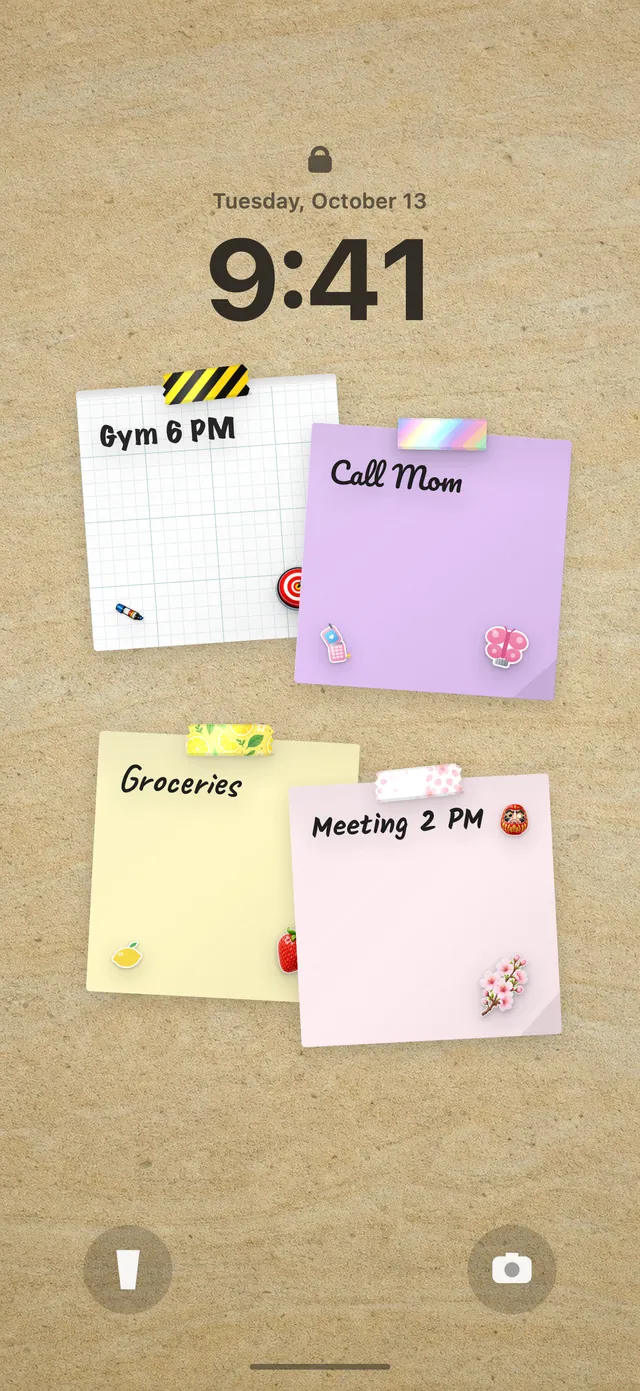
Because your wall is your Lock Screen wallpaper, the paper sits under the clock with your goal and amount written on it, for example "vacation · $50". It's a single tick: once you've moved the money, open DailyWall and tap + on the paper to mark it done.
With the once-a-week setting, the paper appears every day of the week (Monday to Sunday) until you've ticked it off. After that, it stays out of the way for the rest of the week and comes back fresh next Monday. If payday is Friday, you might see it Monday to Thursday as a gentle heads-up, then tick it Friday evening.
New to putting your wall on the Lock Screen? Our guide to putting notes on your iPhone Lock Screen covers the one-time Shortcuts setup.
A tight week? Skip without guilt
Some weeks the money just isn't there: an unexpected bill, a trip, a month with five weekends. DailyWall doesn't punish that. There's no streak to break, and the amount isn't doubled next week. Each day's paper stays faded on its own day, and a new week starts clean.
If you're missing most weeks, the amount is probably too high for now. It's better to save $10 every week than to aim for $50 and keep skipping. Lower it, keep the habit alive, and raise it again when things ease up.
A 4-week saving starter plan
Tick the steps as you go
Questions people ask
How much money should I save each week?
There's no single right number; it depends on your income and costs. A good start is an amount you can save every week without stress, then raise it over time. For advice on your own situation, talk to a qualified financial adviser.
Does DailyWall connect to my bank account?
No. DailyWall doesn't connect to banks or move money. It's a visible weekly reminder with your goal and amount; you make the transfer yourself and tick it off.
Can I save on payday instead of once a week?
Yes. Instead of once a week you can choose specific days, for example the day your salary arrives, and the paper only appears on those days.
Which currency does the saving habit use?
The amount uses your iPhone's currency setting, so it shows as dollars, pounds, euros or whatever your region uses.
Can I do the 52-week savings challenge with DailyWall?
Yes. Set the habit to once a week and an end date a year away. Since the challenge amount rises each week, you can edit the amount as you go, or simply write "52-week challenge" as the goal and use the paper as your weekly check.
Is the saving tracker free?
Yes, your first habit is free and habit papers don't count toward the 5 free notes a day. Pro unlocks unlimited habits.
 A water intake tracker you see every time you check the time
 A reading habit tracker that keeps your book in sight
 A workout tracker that shows up before your excuses do
 How to build a meditation habit that survives busy weeks
 How to start a journaling habit (and actually keep it)
 How to fix your sleep schedule with one gentle bedtime habit
 A vitamin and medicine reminder that sits under the clock
 A daily walking habit you see every time you check the time
 A daily stretching routine you'll actually remember
 A no sugar challenge you see every time you pick up your phone
 How to wake up early (and keep doing it after the first week)
 A gratitude journal habit that takes two minutes a night
 How to build a language learning habit that survives busy weeks