 DailyWall
 Gratitude note
 Water the plants
In DailyWall, tap + → Set up a habit → Mind → Gratitude note, then choose For how many things? (1 to 5, 3 by default). Every evening a paper with that many dots appears on your wall and Lock Screen. Write your good things wherever you like, in a notebook or your phone, and tap + on the paper once for each one.
A gratitude journal sounds almost too simple to matter: before bed, write down a few things that went well. Yet it's one of the most studied small habits in positive psychology, and one of the most often abandoned. People start with a beautiful notebook, write long entries for a week, then quietly stop when the entries start to feel like homework. The fix is to make the habit smaller and more visible. DailyWall puts a small "Gratitude note" paper on your wall with one dot for each thing you want to write down, three by default. It sits on your Lock Screen all evening, so the reminder is the paper itself, not another notification.
Why a gratitude habit is worth two minutes
The classic exercise is called "three good things": each evening, note three things that went well and, ideally, why they happened. Several studies in positive psychology have linked regular gratitude writing with small improvements in mood and life satisfaction, and some people report falling asleep with a calmer mind. The effects in research are modest and vary from person to person, so think of it as a gentle tune-up for attention, not a cure for anything.
The real mechanism is simple. Our brains are good at remembering what went wrong; a missed train sticks better than a kind message. Writing down good things trains you to notice them during the day, because you know you'll need three by tonight. After a couple of weeks, many people say the biggest change isn't the writing at all, it's that they catch good moments while they're happening.
A gratitude note is not a way to pretend a bad day was fine. If you've had a hard stretch, it's fine to write "the tea was hot" and nothing more. And if low mood has lasted for weeks, a journal is no substitute for talking to a doctor or a mental health professional.
What to write when you can't think of anything
The blank line is where most gratitude journals die. These prompts keep it from feeling repetitive:
Tick the steps as you go
Set up your gratitude habit in DailyWall
The paper comes with its own 3 gratitude-themed washi tapes and 3 stickers that only appear on habit papers, so it stands out softly among your other notes. DailyWall counts the habit; your actual words stay wherever you write them, whether that's a paper notebook, the Notes app or the back of a receipt.
Tick the steps as you go
Why the Lock Screen helps an evening habit
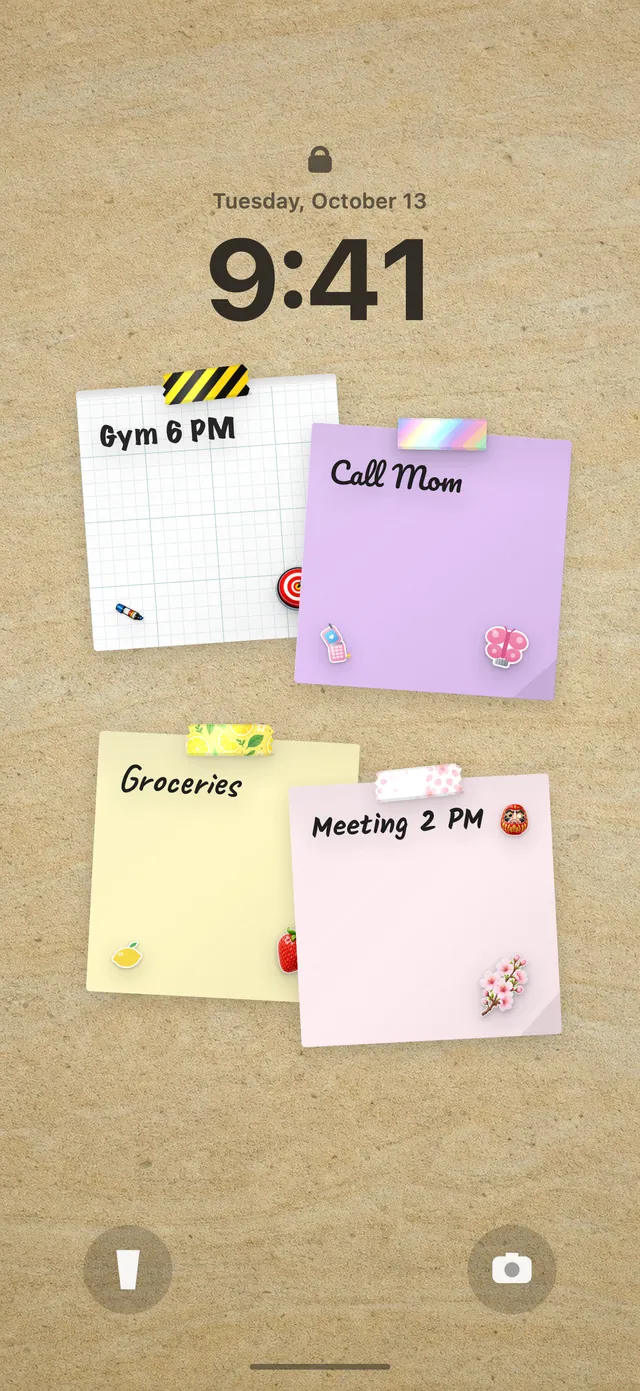
Evening habits fail for a predictable reason: by the time you're in bed, you've forgotten them. Because your DailyWall wall is your Lock Screen wallpaper, the gratitude paper is under the clock every time you check your phone in the evening, including that last glance before sleep. Three empty dots are a quiet question: what went well today?
Tap + on the paper after each thing you write and a dot fills. When you leave DailyWall, the one-time Shortcuts automation refreshes your wallpaper, so the next glance shows "2 of 3" or a full row. If you haven't set up the wallpaper yet, see how to put notes on your iPhone Lock Screen.
Gratitude note or journal?
DailyWall has two writing habits in the Mind category. A gratitude note is short and structured: a number of good things, each one a dot. A daily journal is open-ended, for whatever is on your mind. If long entries make you put the pen down, start with gratitude; if three lines start to feel too small, add a journal on another evening.
Missed an evening? That's fine
Some nights you'll fall asleep first. In DailyWall, that evening's paper isn't carried over to tomorrow, and there's no streak counter to reset. It stays faded on its own day, and the next evening starts fresh. Nobody needs to write six good things to "catch up".
Some research even suggests gratitude writing can feel more meaningful when it isn't a chore every single day. If daily starts to feel mechanical, pick three or four evenings a week under the days setting, or lower the count to one thing. A habit you enjoy beats one you endure.
A 7-day gratitude starter plan
Tick the steps as you go
Questions people ask
How many things should I write in a gratitude journal?
Three is the classic number, but one specific thing is better than five vague ones. In DailyWall you can choose from 1 to 5 and change it any time.
Do I write my gratitude list inside DailyWall?
DailyWall tracks the habit with dots on a paper. You write the things wherever you prefer, such as a notebook or the Notes app, and tap + on the paper for each one.
When is the best time to write a gratitude journal?
Many people like the evening, when the day is done; that's why the template defaults to 10pm. Morning works too if your evenings are unpredictable. You can pick the time of day and a reminder.
Can I see my gratitude journal habit on my Lock Screen?
Yes. The gratitude paper sits on your wall, and your wall is your Lock Screen wallpaper, so the dots show under the clock.
What if I skip a night?
Nothing breaks. The paper stays faded on that day, it isn't moved to tomorrow, and there's no streak to lose.
Is the gratitude habit free?
Your first habit is free, and habit papers don't count toward the 5 free notes a day. Pro unlocks unlimited habits.
 A water intake tracker you see every time you check the time
 A reading habit tracker that keeps your book in sight
 A workout tracker that shows up before your excuses do
 How to build a meditation habit that survives busy weeks
 How to start a journaling habit (and actually keep it)
 How to fix your sleep schedule with one gentle bedtime habit
 A vitamin and medicine reminder that sits under the clock
 A daily walking habit you see every time you check the time
 A daily stretching routine you'll actually remember
 A no sugar challenge you see every time you pick up your phone
 How to wake up early (and keep doing it after the first week)
 How to build a language learning habit that survives busy weeks
 How to build a saving money habit, one small deposit a week