 DailyWall
 Bed by 11pm
 Water the plants
In DailyWall, tap + → Set up a habit → Go to bed early. Set your target bedtime and when to be reminded: on time, or 15, 30 or 60 minutes before. If you prefer to aim for hours of sleep, choose 8 hours of sleep and set the hours (6–10) and your wake time.
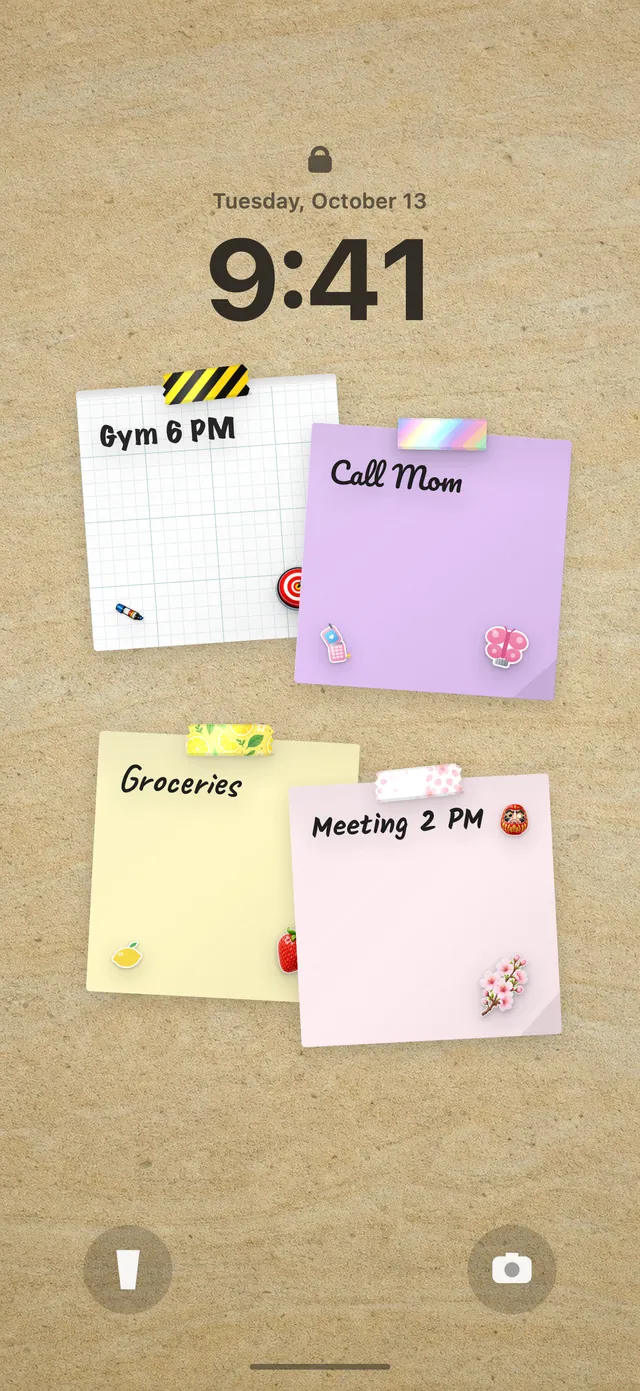
"I'll go to bed early tonight" is a promise most of us make at 7am and break at 11:45pm with the phone in hand. The problem isn't that we don't know sleep matters; it's that bedtime has no cue. Nothing tells you the evening is ending. DailyWall gives your bedtime a visible place: a paper on your Lock Screen with your target time on it, plus a reminder early enough to actually wind down.
Why a regular schedule matters as much as hours
Many health bodies suggest that most adults need around seven or more hours of sleep a night, and sleep researchers often stress regularity too: going to bed and getting up at roughly the same times, including at weekends. A steady rhythm makes it easier to fall asleep and wake without a fight.
The catch is that wake time is usually fixed by work, school or children, so the only lever you really control is bedtime. That's why DailyWall's sleep habit focuses on going to bed, not on tracking your sleep. If you have ongoing sleep problems, talk to a doctor; a habit tracker can help with routine but isn't a treatment.
Two templates: bedtime or hours
Go to bed early asks for your target bedtime (11pm by default) and when to remind you: on time, 15 minutes, 30 minutes or 1 hour before. Thirty minutes is the default, because the reminder should arrive when you can still start winding down, not when you should already be asleep.
8 hours of sleep works backwards from the morning. It asks how many hours you want (6 to 10, in half-hour steps) and your wake time (7am by default). It's useful if you think in terms of total sleep rather than a fixed bedtime.
Both live in the Health category. Most people only need one.
Wind-down tips that make bedtime easier
Tick the steps as you go
Set up your sleep habit in DailyWall
Tick the steps as you go
Your bedtime on the Lock Screen
The bedtime paper appears on your wall by itself on your chosen days, with its own sleepy washi tapes and stickers. Because the wall is your Lock Screen wallpaper, every evening glance at your phone shows your target time, and the reminder arrives when you set it.
When you make it to bed on time, tap + on the paper before you put the phone down. It's a small, satisfying full stop to the day. To set up the Lock Screen wall, see how to put notes on your iPhone Lock Screen.
After a late night
Late nights happen: a film that ran long, a friend's birthday, a baby who won't settle. DailyWall doesn't carry that night's paper forward or flag a broken streak. It stays faded on its own day.
The best response to a late night is not an extra-early bedtime the next day, which you probably won't sleep through, but simply returning to your normal target and your usual wake time.
A 7-day sleep schedule starter plan
Tick the steps as you go
Questions people ask
How do I fix my sleep schedule?
Keep a fixed wake time, move bedtime earlier in small steps of about 15 minutes, and use a reminder early enough to wind down. Consistency matters more than any single night.
How long does it take to reset a sleep schedule?
It varies, but small daily shifts over one to two weeks are usually more comfortable than one big jump.
Can DailyWall remind me to go to bed?
Yes. The Go to bed early habit reminds you on time, or 15, 30 or 60 minutes before your target bedtime, and shows the paper on your Lock Screen.
Does DailyWall track my sleep?
No. It doesn't measure sleep or use Apple Health. It's a bedtime habit: a target, a reminder and a paper you mark when you make it.
Should I aim for a bedtime or a number of hours?
If your wake time is fixed, a bedtime target is simplest. If your mornings vary, the 8 hours of sleep template lets you set hours and a wake time instead.
 A water intake tracker you see every time you check the time
 A reading habit tracker that keeps your book in sight
 A workout tracker that shows up before your excuses do
 How to build a meditation habit that survives busy weeks
 How to start a journaling habit (and actually keep it)
 A vitamin and medicine reminder that sits under the clock
 A daily walking habit you see every time you check the time
 A daily stretching routine you'll actually remember
 A no sugar challenge you see every time you pick up your phone
 How to wake up early (and keep doing it after the first week)
 A gratitude journal habit that takes two minutes a night
 How to build a language learning habit that survives busy weeks
 How to build a saving money habit, one small deposit a week