 DailyWall
 Study a language
 Water the plants
Keep the daily target small (10–20 minutes), study at the same moment every day, and mix input with speaking. In DailyWall, tap + → Set up a habit → Study a language, type which language, choose how many minutes (5–120, 15 by default) and how you'll study: with an app, a course, a book or by speaking. The paper then hangs on your wall and Lock Screen every day, and you tap + to fill it as the minutes add up.
Most people who give up on a new language don't give up because it's too hard. They give up because life gets busy, a day gets skipped, then a week, and the app icon quietly slides off the first Home Screen page. Languages reward one thing above almost everything else: showing up often, even briefly. This page is about making that daily contact automatic, with a realistic plan, tactics that actually move you forward, and a small paper on your iPhone Lock Screen that says "Study a language" with today's minutes on it.
Why a little every day beats a lot on Sundays
Language learning is mostly memory work, and memory is built by repetition spread over time. Research on the so-called spacing effect has shown for decades that reviewing material across several short sessions tends to stick better than cramming the same amount into one long one. Fifteen minutes a day gives you seven spaced contacts a week; two hours on Sunday gives you one.
There's a second, less scientific reason: daily practice keeps the language "switched on" in your head. You start noticing words on menus, in song lyrics, in a film's subtitles. That noticing is free extra practice, and it fades fast when you only study once a week.
None of this means long sessions are bad. A weekly class or a long conversation is great. It just works best on top of a short daily habit, not instead of one.
Pick a method that matches your goal
DailyWall asks How will you study? because the best method depends on why you're learning. Be honest about the goal, and the method follows:
Tick the steps as you go
Tactics that make the minutes count
Fifteen minutes is enough if you spend them well. These habits come up again and again among people who actually reach conversational level:
Tick the steps as you go
Set up your language habit in DailyWall
The paper comes with its own 3 language-themed washi tapes (colorful speech bubbles, a globe with stamps, pennants) and 3 stickers (a globe wearing headphones, speech bubbles, a passport). They only appear on this habit's paper, so it stands out on your wall.
Tick the steps as you go
What it looks like on your Lock Screen
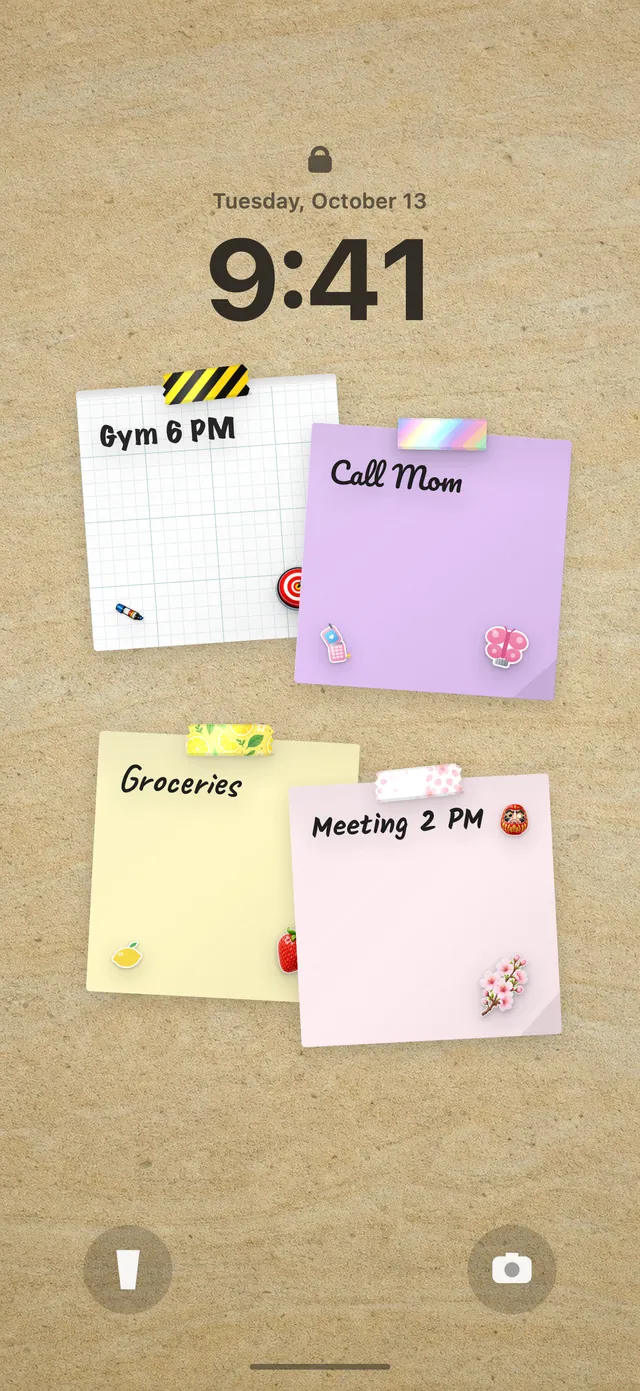
Your DailyWall wall is your Lock Screen wallpaper, so the language paper sits right under the clock with the language name and a row of dots. After a five-minute review on the bus, open the app and tap + on the paper: one dot fills. After another ten minutes at lunch, two more. When you close DailyWall, the Shortcuts automation refreshes the wallpaper, so your next glance shows "10/15 min" instead of an empty row.
That glance is the whole trick. The moment you pick up your phone to scroll is exactly the moment you could do a quick review instead, and the paper is there to remind you without a single notification. If you haven't connected your wall to the Lock Screen yet, our guide to putting notes on your iPhone Lock Screen walks through the one-time setup.
Missed a day? Your progress doesn't vanish
Many language apps make a missed day feel like a disaster: the streak resets, the mascot looks sad, and it's tempting to give up entirely. DailyWall works differently. A missed day's paper isn't carried over and nothing piles up; it simply stays faded on its own day, and tomorrow's paper starts fresh.
What you learned is still in your head. Forgetting a few words over a missed weekend is normal, and a quick review brings most of them back. If you keep missing, shrink the target to 5 minutes or move the reminder to a moment you're reliably free, like your commute.
Honest expectations
Fifteen minutes a day won't make you fluent in three months, whatever the ads say. How long it takes depends on how close the language is to ones you already know, how much you listen and speak, and what "good enough" means for you. A language with a new script or very different grammar simply takes longer, and that's fine.
What a daily habit does reliably is keep you moving. After a few months of steady practice most learners can handle simple, real situations: ordering food, small talk, following a slow podcast. That's usually the point where learning starts to feel fun rather than like homework.
A 7-day language starter plan
Tick the steps as you go
Questions people ask
Is 15 minutes a day enough to learn a language?
It's enough to make steady progress and to keep the language active in your memory, especially with spaced review and some speaking. Reaching fluency takes much longer and usually needs extra input like reading, shows or conversation on top.
Can I use DailyWall alongside Duolingo or another language app?
Yes. DailyWall doesn't teach the language; it's the visible reminder and the daily check. Choose "With an app" as your method, study in whatever app you like, and fill the dots on your DailyWall paper as you go.
Can I track two languages at once?
Yes, you can set up the habit twice with different language names. Your first habit is free; more than one habit needs Pro.
What happens to my progress if I skip a day?
Nothing is lost and nothing is added to tomorrow. The missed day's paper stays faded on that day, and the next day starts with a fresh paper.
Can I count vocabulary words instead of minutes?
The language habit counts minutes. DailyWall also has a separate New words template in the Learning category that counts words per day, if you want a vocabulary goal too.
Is the language learning tracker free?
Yes, your first habit is free and habit papers don't count toward the 5 free notes a day. Pro unlocks unlimited habits.
 A water intake tracker you see every time you check the time
 A reading habit tracker that keeps your book in sight
 A workout tracker that shows up before your excuses do
 How to build a meditation habit that survives busy weeks
 How to start a journaling habit (and actually keep it)
 How to fix your sleep schedule with one gentle bedtime habit
 A vitamin and medicine reminder that sits under the clock
 A daily walking habit you see every time you check the time
 A daily stretching routine you'll actually remember
 A no sugar challenge you see every time you pick up your phone
 How to wake up early (and keep doing it after the first week)
 A gratitude journal habit that takes two minutes a night
 How to build a saving money habit, one small deposit a week