 DailyWall
 Meditation
 Water the plants
In DailyWall, tap + → Set up a habit → Meditation. Choose how many minutes (1–60) and how you meditate: silent, guided or breath-focused. A meditation paper then appears on your wall and Lock Screen each chosen day, and you fill its dots as you sit.
Almost everyone who tries meditation has the same experience: a few calm mornings, then a busy week, then a vague feeling that you "used to meditate". The practice itself is simple; remembering to sit down is the hard part. DailyWall turns your meditation into a small paper on your Lock Screen, so the first thing you see when you reach for your phone in the morning is a quiet reminder to breathe before you scroll.
Why a few minutes is enough
You don't need an hour on a cushion to benefit from meditation. Many teachers and studies point to short, regular practice as the place to start: a few minutes of paying attention to your breath, most days, rather than long sessions now and then. People commonly describe feeling calmer and more focused, though experiences differ and meditation isn't a substitute for professional help if you're struggling.
Short sessions also remove the biggest excuse. "I don't have time" is hard to believe when the goal is five minutes. And once sitting still becomes a normal part of your morning, you can always make it longer.
Silent, guided or breath-focused?
DailyWall asks how you meditate, because the three styles suit different people.
Silent meditation means sitting with no audio, often with a timer. It's the most portable kind: you can do it anywhere, with nothing but a quiet minute.
Guided meditation uses a recording or a teacher's voice. It's ideal if your mind wanders a lot or you're new to the practice. Use whatever guided app or recording you already like; DailyWall is the reminder, not the player.
Breath-focused practice keeps your attention on counting or following the breath. It's a good middle ground and works well in short sessions.
Small things that keep the practice going
Tick the steps as you go
Set up your meditation habit in DailyWall
Tick the steps as you go
A calm note under the clock
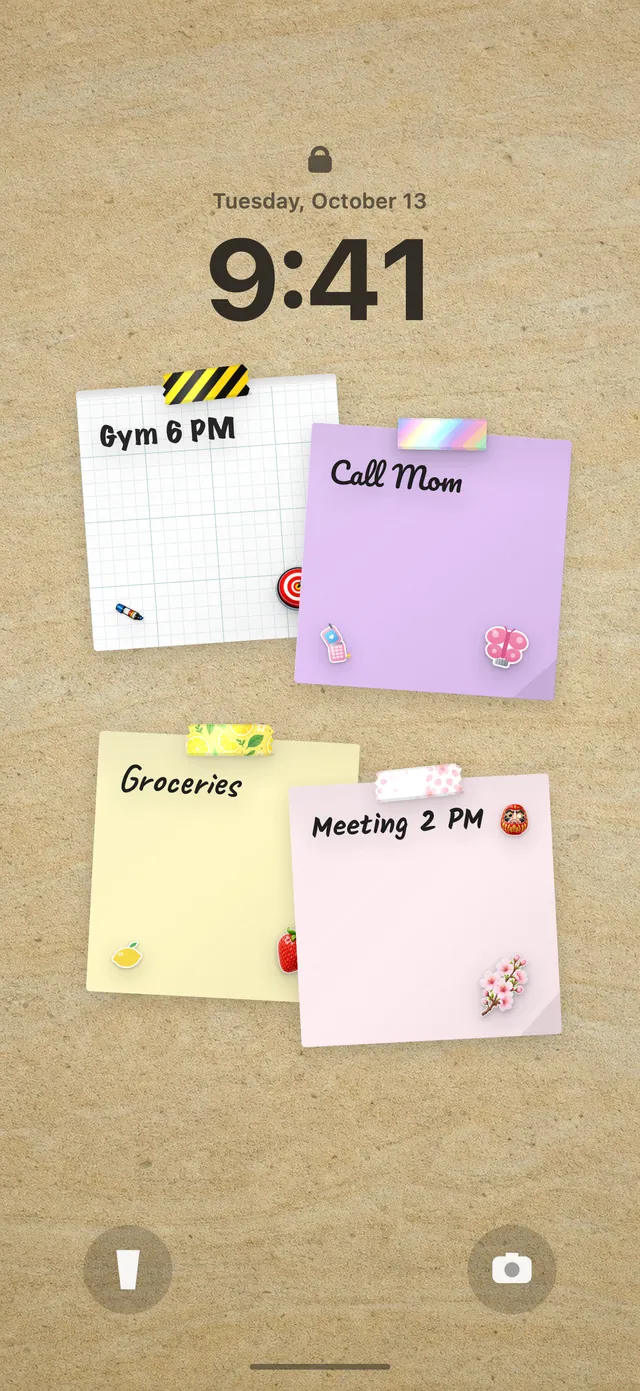
Your meditation paper hangs on the wall by itself on the days you chose, decorated with its own 3 washi tapes and 3 stickers. Because the DailyWall wall is your Lock Screen wallpaper, it's the first thing you see in the morning, before notifications pull you elsewhere. After you sit, open the app, tap + to fill dots, and close it; the Lock Screen updates.
Unlike a notification that buzzes, the paper simply waits there. For a habit about attention, that quieter kind of reminder fits well. First time setting up the Lock Screen wall? See how to put notes on your iPhone Lock Screen.
When you skip a day
Meditation is about meeting yourself without judgement, and a tracker that punishes you for missing a day would contradict that. In DailyWall, a missed meditation paper isn't carried over and there's no streak counter. It simply stays faded on its own day.
Tomorrow, sit again. If you can only manage one minute, do one minute. Returning matters more than any single session.
A 7-day meditation starter plan
Tick the steps as you go
Questions people ask
How many minutes a day should I meditate?
Many beginners start with 2 to 10 minutes. Regularity matters more than length; you can increase it once sitting feels natural.
Is it better to meditate in the morning or at night?
Whichever you'll actually keep. Mornings tend to be more predictable, but evening practice suits some people. DailyWall lets you pick the time of day or an exact time.
Does DailyWall include guided meditations?
No. DailyWall is the habit reminder and tracker. You can choose "guided" as your style and use any meditation recording you like.
Can I see my meditation habit on my Lock Screen?
Yes. The meditation paper is part of your wall, which is your Lock Screen wallpaper, so it appears under the clock on your chosen days.
What if I miss a day of meditation?
Nothing breaks. The paper stays faded on that day, there's no streak to lose, and you start fresh the next day.
 A water intake tracker you see every time you check the time
 A reading habit tracker that keeps your book in sight
 A workout tracker that shows up before your excuses do
 How to start a journaling habit (and actually keep it)
 How to fix your sleep schedule with one gentle bedtime habit
 A vitamin and medicine reminder that sits under the clock
 A daily walking habit you see every time you check the time
 A daily stretching routine you'll actually remember
 A no sugar challenge you see every time you pick up your phone
 How to wake up early (and keep doing it after the first week)
 A gratitude journal habit that takes two minutes a night
 How to build a language learning habit that survives busy weeks
 How to build a saving money habit, one small deposit a week