 DailyWall
 Walk / steps
 Water the plants
In DailyWall, tap + → Set up a habit → Movement → Walk / steps. Choose whether to measure in steps (1,000–30,000, 8,000 by default) or minutes (10–180, 30 by default) and how much each tap adds. The paper appears on your wall and Lock Screen every day, and you tap + to fill it as you walk.
Walking is the most underrated habit there is. It needs no gym, no kit and no plan, and it's the one form of exercise most people can keep doing for decades. The catch is that it's also the easiest to skip: there's always a reason to take the car, the lift or the sofa. DailyWall turns your walk into a small paper on your Lock Screen, with your target for the day. You see it every time you pick up your phone, and filling it in takes one tap.
Do you really need 10,000 steps?
The famous 10,000 figure is often traced back to a 1960s Japanese pedometer called the manpo-kei, literally "10,000-step meter". It was a catchy round number, not a medical threshold. Several large studies since then suggest that the benefits of walking start well below 10,000 steps and tend to level off somewhere in the high thousands, depending on your age.
Many health bodies phrase it in time instead: around 150 minutes of moderate activity a week for adults, which is about 30 minutes on five days. A brisk walk counts. That's why DailyWall lets you measure either way. If you track steps with your watch or phone, set a step goal; if you'd rather just go out for half an hour, set minutes. If you have a heart, joint or other health condition, ask your doctor what's right for you before raising your target.
How to walk more without "finding time"
Most extra steps don't come from dedicated walks. They come from small changes to things you already do:
Tick the steps as you go
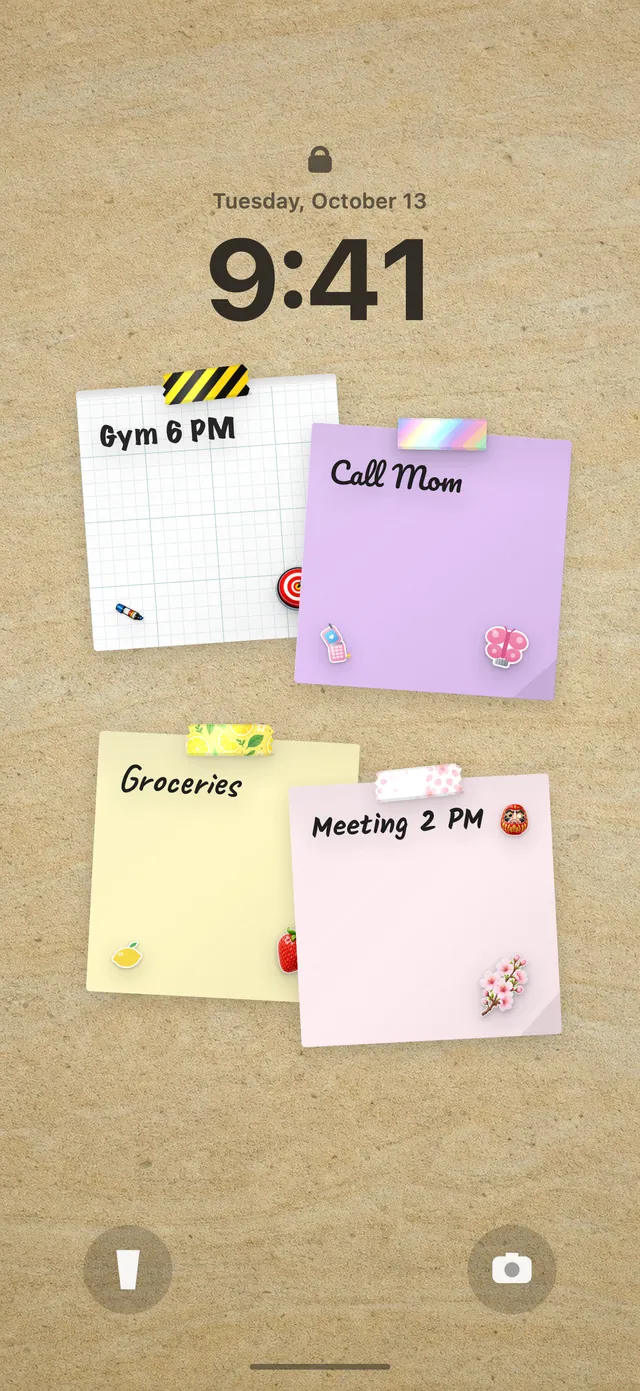
Set up your walking habit in DailyWall
DailyWall doesn't count your steps for you, and it doesn't read Apple Health. You glance at your watch or step counter and fill the paper yourself. That sounds like a drawback, but it's the point: the tap is a tiny moment of noticing what you've done, which is exactly what builds a habit.
Tick the steps as you go
Choosing your tap size
If you just want a yes/no for the day, choose All at once: one tap when you hit your target. If you'd like to see progress through the day, split it. With 8,000 steps at +1,000 per tap, the paper has eight dots, and at 3pm you can see at a glance that you're at five out of eight. With 30 minutes at +5, a short walk to the shop fills one dot and the evening loop fills the rest.
Splitting works especially well for people who walk in bits: the school run, the lunch break, the walk home.
On your Lock Screen, with a bit of the outdoors
Your DailyWall wall is your Lock Screen wallpaper, so the walking paper sits under the clock all day. After you tap +, close the app and the Shortcuts automation refreshes the wallpaper. If you haven't set that up yet, see how to put notes on your iPhone Lock Screen.
The paper has its own three washi tapes (rolling hills with trees, footprints with autumn leaves, and an autumn forest) and three stickers: a happy dog on a lead, hiking boots and a trail signpost. They appear only on habit papers, so your walk stands out on the wall.
Rainy day? Nothing breaks
Some days it pours, you're ill or the day simply runs away. In DailyWall, an unfinished walking paper isn't carried over to tomorrow and there's no streak to lose. It stays faded on its own day, and tomorrow a fresh one is waiting.
If you keep missing on certain days, set the habit only for the days you can realistically walk, or lower the target. Walking four days a week, every week, beats a seven-day plan you abandon in March.
A 7-day walking starter plan
Tick the steps as you go
Questions people ask
Does DailyWall count my steps automatically?
No. DailyWall doesn't connect to Apple Health or your watch. You check your step count wherever you already track it and tap + on the paper to fill it in.
How many steps a day should I aim for?
There's no single right number. Studies suggest benefits start well below 10,000. Start a little above your current daily average and raise it slowly. If you have a health condition, ask your doctor.
Can I track walking minutes instead of steps?
Yes. Under How should we measure it?, choose Duration and set 10 to 180 minutes a day.
Can I see my steps progress on my iPhone Lock Screen?
Yes. If you split your goal into taps (for example +1,000 steps), the paper shows dots that fill as you go, and the wall is your Lock Screen wallpaper.
Is the walking habit free?
Yes, your first habit is free and habit papers don't count toward the 5 free notes a day. Pro unlocks unlimited habits.
 A water intake tracker you see every time you check the time
 A reading habit tracker that keeps your book in sight
 A workout tracker that shows up before your excuses do
 How to build a meditation habit that survives busy weeks
 How to start a journaling habit (and actually keep it)
 How to fix your sleep schedule with one gentle bedtime habit
 A vitamin and medicine reminder that sits under the clock
 A daily stretching routine you'll actually remember
 A no sugar challenge you see every time you pick up your phone
 How to wake up early (and keep doing it after the first week)
 A gratitude journal habit that takes two minutes a night
 How to build a language learning habit that survives busy weeks
 How to build a saving money habit, one small deposit a week