 DailyWall
 Read a book
 Water the plants
In DailyWall, tap + → Set up a habit → Read a book. Choose whether to measure in pages or minutes, set how many (for example 20 pages or 20 minutes), and type the book you're reading. A reading paper then appears on your wall and Lock Screen on your chosen days.
"I used to read so much" is one of the most common things people say about themselves. Reading rarely disappears because we stop enjoying it; it gets squeezed out by a phone that is always closer than the book. DailyWall flips that around. Your reading habit becomes a paper on your Lock Screen with the name of your book on it, so the phone itself reminds you to put it down and read.
Why a small daily reading goal works
Big reading goals, like 52 books a year, sound inspiring in January and feel crushing by March. A small daily target is different. Twenty pages a day is roughly a 300-page book every two weeks, which adds up to well over twenty books a year, without ever feeling like a marathon.
Daily reading also lowers the cost of starting. When you read a little every day, you never lose the thread of the story, so picking the book up again is easy. That ease is what turns reading back into a habit rather than a project.
Pages or minutes: which should you choose?
DailyWall lets you measure reading either way, and the right choice depends on what you read.
Pages work well for novels and books with a steady pace. They give you a clear finish line and a satisfying sense of progress through the book.
Minutes are better for dense non-fiction, textbooks, or books in a second language, where ten pages can take an hour. Measuring time removes the pressure to rush, and you still show up every day.
If you can't decide, start with minutes. It's harder to cheat yourself with a timer, and easier to forgive a slow chapter.
Tricks that make reading stick
Tick the steps as you go
Set up your reading habit in DailyWall
Tick the steps as you go
Your book, under the clock
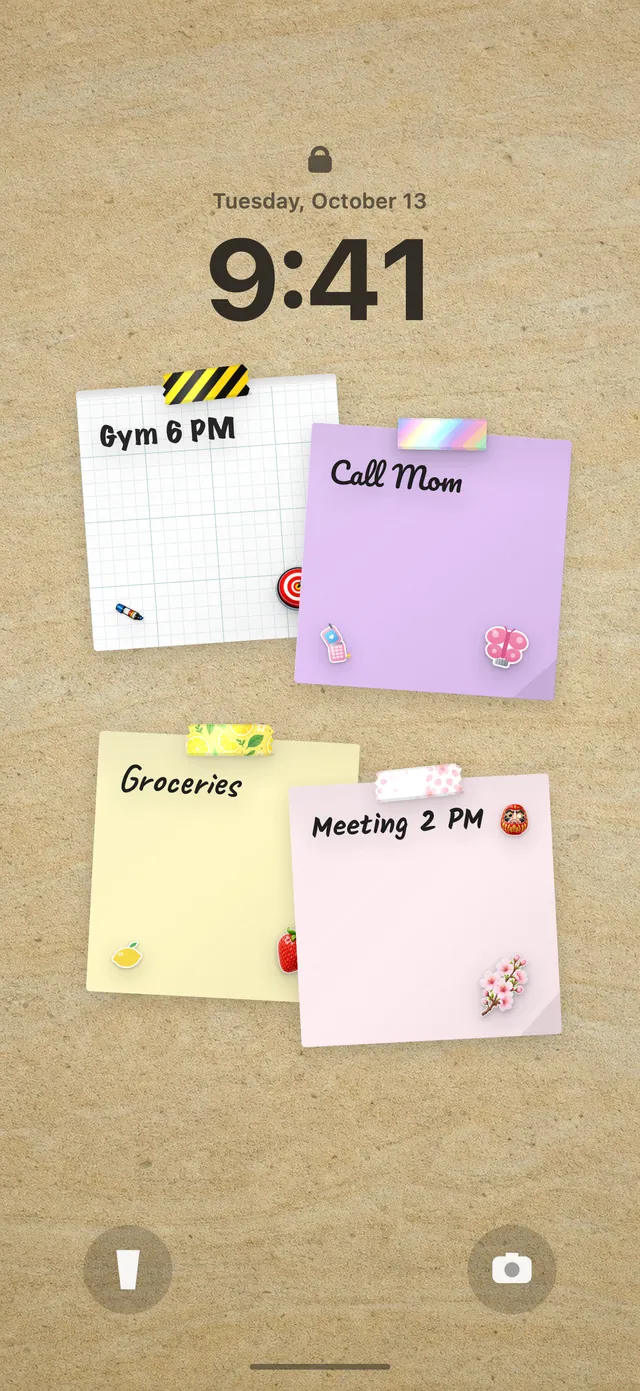
Once the habit is set, the reading paper hangs on your wall by itself on the days you chose, with its own book-themed washi tapes and stickers. Because DailyWall's wall is your Lock Screen wallpaper, the book's name and your progress dots are visible every time you wake your phone. Tap + on the paper as you read, then close the app and the Lock Screen catches up.
There's something about seeing the title of the book you're halfway through that makes scrolling feel like the less interesting option. New to the Lock Screen wall? Here's how to put notes on your iPhone Lock Screen.
When you don't read
Some evenings you'll fall asleep after two pages, or not open the book at all. That's fine. DailyWall doesn't carry the missed paper over or punish you with a broken streak; yesterday's reading paper just stays faded on its own day.
If you miss several days in a row, look at the setup rather than at yourself. Maybe the time is wrong, the target too big, or the book isn't grabbing you. Switch to minutes, lower the number, or change the book.
A 7-day reading starter plan
Tick the steps as you go
Questions people ask
How do I build a daily reading habit?
Start small (10 pages or 10 minutes), tie it to a fixed moment like bedtime, and keep the book visible. A reminder you see every day, like a paper on your Lock Screen, helps a lot.
Is it better to track pages or minutes?
Pages suit novels and steady reads; minutes suit dense or difficult books. DailyWall lets you choose either when you set up the habit.
Can I show the book I'm reading on my Lock Screen?
Yes. You type the book's name when you set up the reading habit, and the paper on your wall and Lock Screen shows it.
Does DailyWall track my reading statistics?
No. It keeps things simple: a daily paper with progress dots. There are no charts or reading stats.
Can I do a 30-day reading challenge?
Yes. Set an end date when you create the habit, and the reading paper appears every chosen day until then.
 A water intake tracker you see every time you check the time
 A workout tracker that shows up before your excuses do
 How to build a meditation habit that survives busy weeks
 How to start a journaling habit (and actually keep it)
 How to fix your sleep schedule with one gentle bedtime habit
 A vitamin and medicine reminder that sits under the clock
 A daily walking habit you see every time you check the time
 A daily stretching routine you'll actually remember
 A no sugar challenge you see every time you pick up your phone
 How to wake up early (and keep doing it after the first week)
 A gratitude journal habit that takes two minutes a night
 How to build a language learning habit that survives busy weeks
 How to build a saving money habit, one small deposit a week