 DailyWall
 Morning workout
 Water the plants
In DailyWall, tap + → Set up a habit and choose Morning workout or Strength training. Set the minutes and the type or focus, choose your training days, and a workout paper appears on your wall and Lock Screen on those days only.
Most workout plans don't fail in the gym. They fail at 6:58am, when the alarm goes off and the plan is buried in an app you'd have to open, read and think about. DailyWall keeps it simpler: a paper on your Lock Screen that says "Morning workout, 15 min" on the days you train. You see it with the alarm, you know exactly what's expected, and that removes most of the negotiation.
Why consistency beats intensity
Many health bodies suggest adults aim for regular moderate activity across the week, plus some muscle-strengthening work on a couple of days. What the guidance doesn't say is that every session has to be hard. For most people starting out, the biggest gains come simply from moving regularly.
That's why a workout tracker should reward showing up, not personal records. A 15-minute session you do four times a week will change more than a 90-minute plan you abandon after ten days. Always check with a doctor before starting a new exercise programme if you have health concerns.
How to make workouts happen
Tick the steps as you go
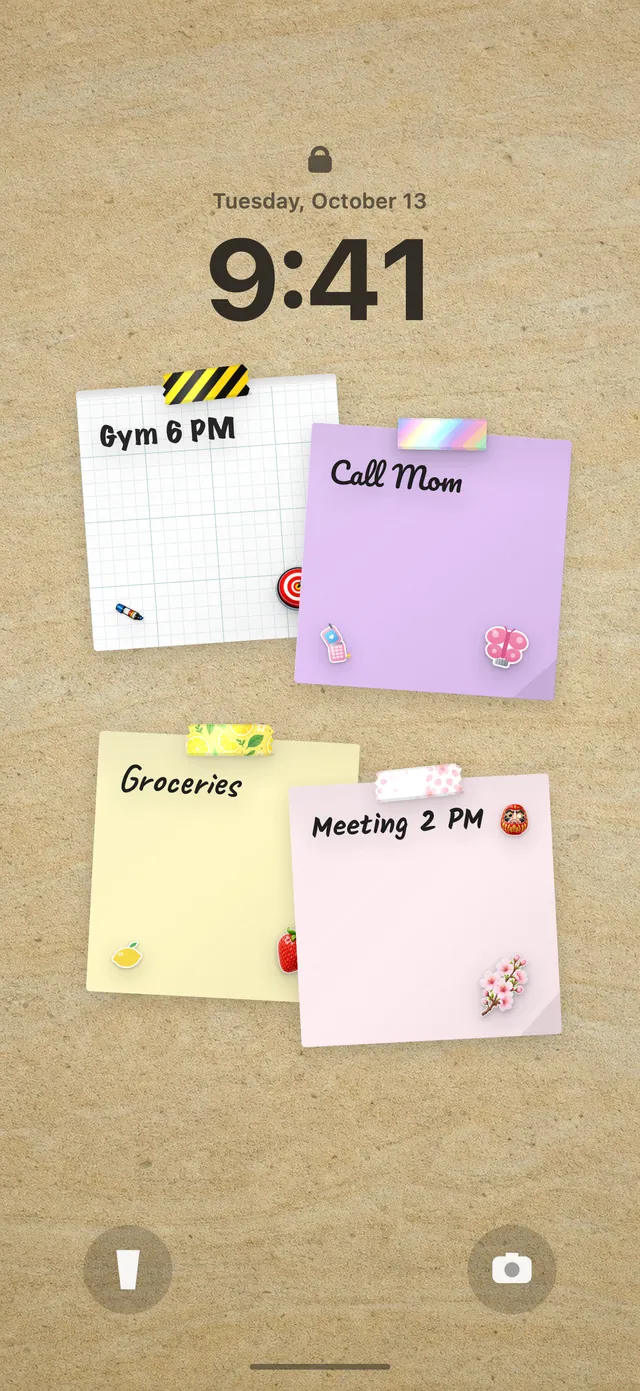
Two templates: Morning workout and Strength training
DailyWall's Movement category has two templates built for this. Morning workout is for short, regular sessions; it asks how many minutes (5 to 90, 15 by default) and what type: mixed, cardio, HIIT or strength. It defaults to weekdays in the morning.
Strength training is for lifting days. It asks how many minutes (15 to 120, 45 by default) and today's focus: next in your programme, full body, upper body or lower body. It defaults to Monday, Wednesday and Friday in the evening, which leaves rest days between sessions.
You can run both: a short morning session on weekdays and longer strength days three times a week. Each template has its own washi tapes and stickers, so they're easy to tell apart on the wall.
Set up your workout habit in DailyWall
Tick the steps as you go
On your Lock Screen with the alarm
On training days, the workout paper hangs on your wall by itself, and since the wall is your Lock Screen wallpaper, it's there when you turn off the alarm. On rest days it doesn't appear at all, so your Lock Screen isn't nagging you on a day you've planned to recover.
Fill the paper's progress dots with + as you go, then close the app; the Shortcuts automation refreshes the Lock Screen. If you haven't set that up yet, follow how to put notes on your iPhone Lock Screen.
Skipped a session?
You'll miss workouts: illness, late nights, travel, life. DailyWall doesn't move the missed paper to tomorrow or show a broken streak. It stays faded on its own day and the next session starts clean, with no pressure to "make up" for it.
If you skip the same day every week, that's useful information. Move that session to a different day rather than fighting it.
A 7-day workout starter plan
Tick the steps as you go
Questions people ask
What's the simplest way to track workouts?
A visible daily reminder with a clear target. In DailyWall, a workout paper shows the minutes and type on your Lock Screen on training days, and you fill dots as you go.
Can I set workouts for specific days only?
Yes. Choose every day, weekdays, weekends, specific days like Monday/Wednesday/Friday, or a number of times a week.
Does DailyWall track reps, sets or weights?
No. It's a habit tracker, not a training log. It reminds you to show up and lets you mark progress, while your detailed log can stay wherever you keep it.
Does it sync with Apple Health or Apple Watch workouts?
No. The workout habit doesn't use Apple Health data, and habits aren't shown on Apple Watch.
How long does it take to build a workout habit?
It varies widely between people, often several weeks or more. Showing up regularly matters more than the exact number of days.
 A water intake tracker you see every time you check the time
 A reading habit tracker that keeps your book in sight
 How to build a meditation habit that survives busy weeks
 How to start a journaling habit (and actually keep it)
 How to fix your sleep schedule with one gentle bedtime habit
 A vitamin and medicine reminder that sits under the clock
 A daily walking habit you see every time you check the time
 A daily stretching routine you'll actually remember
 A no sugar challenge you see every time you pick up your phone
 How to wake up early (and keep doing it after the first week)
 A gratitude journal habit that takes two minutes a night
 How to build a language learning habit that survives busy weeks
 How to build a saving money habit, one small deposit a week