 DailyWall
 Make your bed
 Water the plants
Make the bed right after you get up, before you look at the phone, and keep it simple: straighten the sheet, pull up the duvet, fluff the pillows. In DailyWall, tap + → Set up a habit → Home & life → Make your bed. There's nothing to configure: it's set to every day at 07:30, the paper shows on your Lock Screen, and you tick it once.
Making your bed is about the smallest habit there is: two minutes, no equipment, no willpower to speak of. That's exactly why it works so well as a first habit. It gives the morning a clear first win, it makes the room feel calmer all day, and it proves to you that you can keep a promise to yourself every single day. This page covers why such a tiny task matters, a quick way to do it, how to chain other habits onto it, and how DailyWall puts a "Make your bed" paper on your iPhone Lock Screen each morning.
Why such a small habit matters
A made bed is a finished task before breakfast. It's a small thing, but small finished things set the tone: the day starts with something done instead of something already behind. The idea became famous through a 2014 commencement speech by retired US Navy Admiral William McRaven, who argued that changing the world starts with making your bed.
It also changes the room. A made bed makes the whole bedroom look tidier, which makes it easier to put the rest away and nicer to come back to at night.
And because it's so easy, it's the ideal first habit if you're new to habits at all. Once one tiny habit runs on its own, adding the next one feels possible.
A 2-minute way to do it
Tick the steps as you go
Chain your morning onto it
Because making the bed happens at the same moment every day, it's a perfect anchor for habit stacking: "After I make my bed, I drink a glass of water." "After I make my bed, I stretch for five minutes." The bed becomes the first link in a short morning chain.
Good partners are a glass of water, a few minutes of stretching, or getting up a little earlier.
Set it up in DailyWall
The bed paper has its own washi tapes (cosy quilts, folded towels and blankets, blue gingham) and stickers (a smiling pillow, a folded plaid blanket, a sleepy alarm clock), used only on this habit.
Tick the steps as you go
One tick under the clock
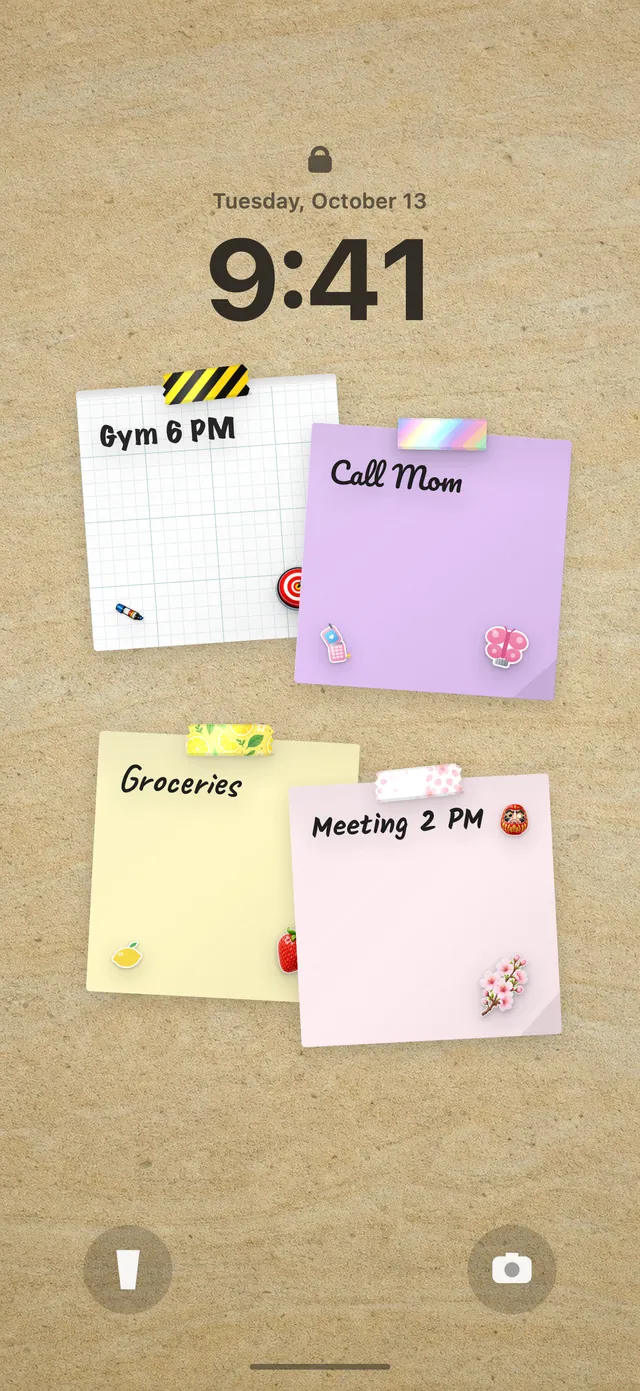
Because your DailyWall wall is your Lock Screen wallpaper, the paper is under the clock when you switch off the alarm. Make the bed, open DailyWall and tap + on the paper. That's the first tick of the day.
Missed it? There's no streak to break. The paper stays faded on its day, and tomorrow morning it's back, clean. New to the Lock Screen setup? Our guide to putting notes on your iPhone Lock Screen walks through it.
Questions people ask
Is making your bed really worth it?
It takes two minutes and gives the day a finished task right at the start, plus a tidier room. Many people use it as the first, easiest habit before building bigger ones.
When is the best time to make the bed?
Right after you get up, before you check your phone, so it happens before the day gets busy. DailyWall sets it to 07:30 by default; change it to match your alarm.
Can I do it only on weekdays?
Yes. The habit starts every day, but you can switch it to weekdays or choose specific days.
Is the make-your-bed habit free?
Yes, your first habit is free and habit papers don't count toward the 5 free notes a day. Pro unlocks unlimited habits.
 A water intake tracker you see every time you check the time
 A reading habit tracker that keeps your book in sight
 A workout tracker that shows up before your excuses do
 How to build a meditation habit that survives busy weeks
 How to start a journaling habit (and actually keep it)
 How to fix your sleep schedule with one gentle bedtime habit
 A vitamin and medicine reminder that sits under the clock
 A daily walking habit you see every time you check the time